Automating software tests does not mean replacing human judgment. It means turning repeatable checks into executable code and workflows, so a team can get fast, consistent, traceable feedback whenever the product changes.
The first question should not be “What is the best testing tool?” but which risk are we trying to reduce, and at what level can we detect it most efficiently? A function, an API, a browser workflow, and a load test each call for a different approach.
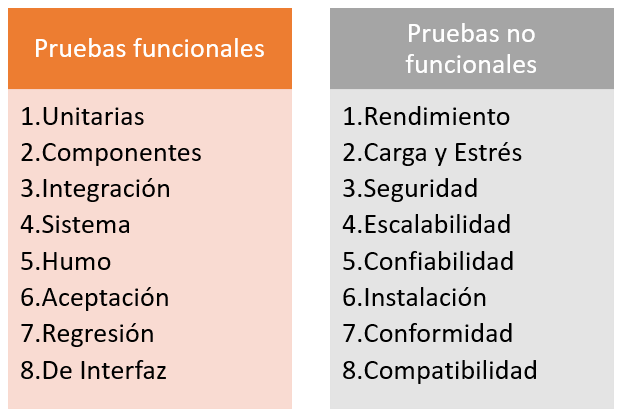
Before picking tools, it helps to understand the difference between functional and non-functional testing and the purpose of each test level. Those distinctions keep us from automating something simply because we can.
For additional context, see our overview of functional and non-functional software testing; the distinction helps teams choose appropriate test levels.
What should we automate?
- Frequent regression checks after code changes.
- Critical business rules and deterministic calculations.
- Interfaces and contracts between services.
- API authorization, validation, and failure handling.
- Data combinations that would be expensive to check manually.
- Repeatable performance benchmarks.
- Post-deployment smoke tests.
- Accessibility and static quality checks where automation can provide reliable evidence.
Exploratory testing, user experience, unexpected behaviors, and complex visual judgment still benefit from people. Treat automation as one part of quality engineering, not a replacement for it.
Build a layered testing strategy
A maintainable suite usually contains many fast checks and a smaller number of slow end-to-end workflows. The testing pyramid is a useful heuristic, not a rigid quota: optimize for risk coverage, speed, reliability, and maintenance cost.
| Level | Primary purpose | Typical cost |
|---|---|---|
| Unit | Validate a small function, class, or component | Very low |
| Integration | Exercise components with real dependencies | Low to medium |
| API / contract | Verify interfaces and consumer expectations | Medium |
| UI / E2E | Validate a complete user journey | High |
| Performance | Measure throughput, latency, and capacity | Variable |
| Exploratory | Investigate risks we have not anticipated | Human-led |
Unit testing
Use the ecosystem’s established framework: JUnit/Jupiter for Java, pytest for Python, NUnit or xUnit for .NET, and Vitest or Jest for JavaScript and TypeScript. Unit tests should execute quickly, have predictable inputs, and report failures in a way that points to the broken behavior.
Integration testing
Integration tests exercise databases, message brokers, file systems, or service boundaries together. Testcontainers can start disposable dependencies in containers during a test run, making integration tests more reproducible across developers’ machines and CI.
API testing
Before reproducing every scenario in a browser, test HTTP endpoints directly. Common choices include a language-specific HTTP client with a test framework, Postman/Newman, Bruno, REST Assured, pytest with httpx or requests, and SuperTest.
Check response status, payload schema, authentication, authorization, validation errors, idempotency, rate limits, and business rules. An HTTP 200 response alone proves very little.
Contract testing
In distributed systems, consumer-driven contract tests help detect breaking changes between clients and providers without starting the entire application stack. Pact is a well-known option. These tests complement, rather than replace, full integration checks.
Selenium WebDriver
Selenium uses the W3C WebDriver standard to automate browsers. It is mature, supports a broad set of programming languages, and is particularly useful when a team relies on heterogeneous browsers, remote browser grids, or established enterprise test infrastructure.
- Bindings include Java, Python, C#, and JavaScript.
- Selenium Manager simplifies driver and browser management.
- Selenium Grid supports remote and parallel execution.
- The ecosystem offers substantial long-term compatibility.
Playwright
Playwright is a strong option for modern web applications. It supports Chromium, Firefox, and WebKit, and offers isolated browser contexts, built-in auto-waiting, traces, screenshots, video recording, and parallel execution.
Its synchronization model removes a great deal of manual waiting code commonly found in older test suites. TypeScript and JavaScript are especially well supported, and official bindings are also available for Python, Java, and .NET.
Cypress
Cypress offers an integrated web-testing experience, including an interactive runner, time-travel debugging, and an API tailored to browser-based application testing. Its execution architecture differs from Selenium and Playwright; depending on the application, those design decisions can be either helpful or limiting.
Choosing Selenium, Playwright, or Cypress
| Criterion | Selenium | Playwright | Cypress |
|---|---|---|---|
| Ecosystem | Very mature | Mature and rapidly evolving | Mature |
| Languages | Wide selection | TS/JS, Python, Java, .NET | Primarily JS/TS |
| Browser approach | WebDriver-supported browsers | Chromium, Firefox, WebKit | Cypress-supported browsers |
| Automatic waiting | More manual design | Strong support | Strong support |
| Enterprise grid | Excellent established options | CI and cloud options | CI and cloud options |
| New web project | Worth evaluating | Strong candidate | Strong candidate |
Run a small proof of concept against your actual application. A framework’s marketing checklist tells you less than how reliably it handles your navigation, authentication, and UI components.
Mobile automation with Appium
For native and hybrid Android and iOS apps, Appium builds on the WebDriver ecosystem. Emulators are convenient, but hardware-specific risks involving sensors, battery, drivers, and radio conditions may still require real devices.
Visual regression testing
Visual regression tools compare rendered screenshots with approved baselines. Playwright and Cypress can be integrated with visual-checking tools and services. Account for fonts, antialiasing, dynamic data, and animations; not every pixel difference is a product defect.
Accessibility checks
axe-core and integrations for browser automation can catch many machine-detectable accessibility violations. They cannot certify full WCAG conformance, however. Manual keyboard testing, assistive technology, and real-user evaluation remain essential.
Performance and load testing
| Tool | Good fit |
|---|---|
| k6 | Scripted load tests, CI integration, supported HTTP and other protocols |
| Apache JMeter | GUI and CLI workflows with an extensive plugin ecosystem |
| Gatling | Programmable load scenarios and efficient load generation |
Define a realistic workload first: arrival rates, concurrent users, test data, test duration, and service-level objectives (SLOs). Sending requests as fast as possible may reveal a limit but does not necessarily model real users.
Automated security testing
Static application security testing (SAST), dependency scanning, secret detection, and dynamic testing (DAST) fit naturally into CI pipelines. They reduce exposure to known classes of problems but cannot replace threat modeling, secure design review, or contextual security assessments.
Continuous integration and delivery
GitHub Actions, GitLab CI, Jenkins, Azure Pipelines, and similar systems can run tests on every commit, pull or merge request, deployment, or schedule.
The goal is not to run the entire universe of tests on every change. Keep unit checks fast, integration checks reliable, and expensive E2E suites focused on risk. Use scheduled or targeted jobs for broader coverage when appropriate.
Test data and environments
- Create repeatable fixtures and known initial states.
- Do not depend on mutable production data.
- Isolate test accounts and tenants.
- Clean up resources after tests.
- Mock only the dependencies whose real behavior is irrelevant to a test’s objective.
- Store random seeds when randomized tests fail so a case can be reproduced.
Why tests become flaky
A flaky test occasionally fails without a corresponding product regression. Common causes include hard-coded sleeps, fragile selectors, race conditions, shared test state, and inconsistent infrastructure. Prefer observable conditions, accessible roles or stable identifiers, and framework-provided waiting mechanisms.
Retries are not a fix
Retries can help absorb external noise, but they should not conceal synchronization defects, data races, or unstable environments. Measure flakiness and treat persistent causes as engineering problems, not as expected background noise.
What metrics are useful?
- Pipeline execution time.
- Rate of actionable failures.
- Flaky-test rate.
- Time to detect a regression.
- Time to investigate a failure.
- Coverage of critical risks, not merely code coverage percentage.
- Maintenance effort per suite.
Quick tool-selection reference
| Need | First options to evaluate |
|---|---|
| Unit tests | Language’s established testing framework |
| APIs | HTTP client + test framework; Postman/Newman or Bruno |
| Contracts | Pact or equivalent |
| Enterprise cross-browser | Selenium |
| Modern web applications | Playwright or Cypress |
| Mobile applications | Appium |
| Load testing | k6, JMeter, or Gatling |
| Accessibility | axe-core plus manual testing |
| CI automation | The CI platform your team already operates |
A practical starting roadmap
- Automate one unit test and one API test.
- Add an E2E smoke test for a business-critical workflow.
- Run them in CI.
- Make your fixtures and test environments deterministic.
- Measure execution time and flakiness.
- Expand coverage when it meaningfully reduces risk.
- Add performance, accessibility, and security checks gradually.