
In software development, it is not enough for an application to “work” during a demo. It must also respond correctly to valid and invalid input, integrate with other components, maintain acceptable performance, protect data, recover from failures, and provide an adequate user experience. That is where software quality assurance and testing come in.
Update note: this article was originally published on July 24, 2023 and has been revised to reflect current ISTQB terminology and the ISO/IEC 25010:2023 product quality model, which was published later, in November 2023.
QA and software testing are not exactly the same thing
Quality Assurance (QA) is broader than testing. It includes the processes, practices, criteria, reviews, and controls used to reduce defects and help a product reach the expected level of quality.
Software testing is part of that quality work. It evaluates a product, component, or system to obtain information about its behavior and detect differences between expected and observed results. Testing is not limited to “finding bugs”: it also builds confidence in the product and provides evidence for deciding whether a version is ready to move forward or be released.
Quality is not achieved by testing only at the end. Requirements reviews, static analysis, component testing, continuous integration, and system testing help detect different classes of problems throughout the development lifecycle.
Test levels, test types, and test techniques: an important distinction
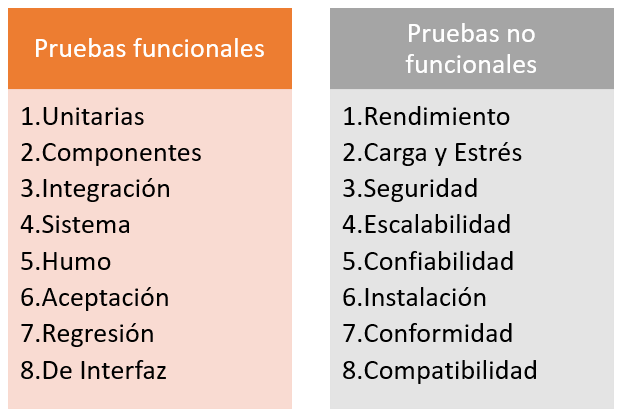
A common mistake is to put unit, integration, functional, regression, black-box, and white-box testing in a single flat list. They actually describe different dimensions of testing.
- Test levels describe the scope being tested: component or unit, integration, system, and acceptance.
- Test types describe the quality characteristic or behavior being evaluated: functional behavior, non-functional properties, internal structure, or the effects of changes, among others.
- Test techniques help derive test cases. These include black-box, white-box, and experience-based techniques.
Therefore, an integration test may be functional or non-functional; a system test may measure performance; and a functional test may be designed using black-box techniques. Black-box and white-box testing are not exclusive subcategories of functional testing.
Functional testing
Functional testing checks what the system does: business rules, calculations, validations, workflows, permissions, API responses, data operations, or any behavior defined by requirements and acceptance criteria.
A simple example is a login form. Functional tests may cover valid and invalid credentials, password recovery, multi-factor authentication, account lockout, and role-based permissions.
Unit or component testing
Unit tests verify small, isolatable parts of the software, such as a function, class, module, or component. They are usually executed early and, in modern projects, are commonly automated as part of continuous integration.
A good unit test should be fast, repeatable, and isolated enough that a failure points clearly to the broken behavior. However, a large unit-test suite does not replace integration or system testing.
Integration testing
Integration tests verify interactions between components: internal modules, databases, queues, APIs, external services, or microservices. A component may work correctly in isolation and fail when a contract, data format, timeout, or dependency changes.
There is no universal rule that integration testing must be owned only by a QA team. Depending on the project, developers, quality engineers, or both may write and execute these tests. What matters is clear responsibility and adequate coverage of critical interfaces.
System testing
System testing evaluates the integrated product as a whole. It covers end-to-end behaviors and requirements that cannot be assessed correctly by looking at one component in isolation. In a web application, for example, a system test may validate a complete business flow involving the frontend, backend, and database.
Acceptance testing
Acceptance testing determines whether the product satisfies the needs and acceptance criteria agreed with users, customers, or other stakeholders. Depending on the context, it may include user, operational, contractual, or regulatory acceptance testing.
Acceptance testing does not have to be entirely manual. Some criteria can be automated while others require human evaluation. The goal is not to repeat every previous test, but to answer whether the product is acceptable for its intended use.
Smoke testing
A smoke test is a small set of checks over critical functions used to determine quickly whether a build is stable enough for deeper testing. It is especially useful after a deployment or when a new build is produced.
Smoke tests may be manual or automated and are not an independent test level. There is also no mandatory position “between integration and regression testing”: they are used wherever a quick health check provides value.
Regression and confirmation testing
Confirmation testing verifies that a specific defect has been fixed. Regression testing checks that a change has not introduced unintended effects into behavior that previously worked.
Regression testing is one of the best candidates for automation when the cases are repetitive, stable, and executed frequently. Automating a scenario that changes constantly, however, may cost more to maintain than it saves.
API and interface testing
Interfaces between systems deserve dedicated testing: status codes, contracts, schemas, authentication, authorization, idempotency, error handling, limits, version compatibility, and behavior when dependencies are unavailable. In distributed architectures these tests often expose problems earlier and at a lower cost than graphical end-to-end tests.
Non-functional testing: how the system behaves
Non-functional testing evaluates quality properties that describe how the product behaves and under which conditions. These are not “secondary” tests: an application may meet every functional requirement and still be unacceptable if it is slow, insecure, inaccessible, or unable to recover from failure.
ISO/IEC 25010:2023 defines a product quality model with nine characteristics: functional suitability, performance efficiency, compatibility, interaction capability, reliability, security, maintainability, flexibility, and safety. The standard is a quality model rather than a rigid list of test types, but it is a useful reference for identifying the attributes that should be evaluated.
Performance testing
Performance testing evaluates response times, sustained throughput, resource utilization, and capacity under defined conditions. Measuring only “how long a page takes to load” is often insufficient: real systems benefit from metrics such as mean latency and percentiles —for example p95 or p99—, transactions per second, concurrency, CPU and memory utilization, saturation, and error rate.
- Load testing: behavior under the expected volume of users or transactions.
- Stress testing: behavior beyond normal limits and how the system degrades or recovers.
- Spike testing: reaction to sudden increases in demand.
- Endurance testing: stability over extended periods.
- Volume testing: behavior with large quantities of data.
Security testing
Security testing aims to identify weaknesses that could affect confidentiality, integrity, authenticity, authorization, or availability. It should go beyond the web interface: source code, dependencies, configuration, APIs, identity, sessions, infrastructure, and business logic can all introduce vulnerabilities.
A modern strategy combines code review, static analysis, dependency analysis, dynamic testing, configuration validation, and risk-driven manual testing. For web applications, the OWASP Web Security Testing Guide is a widely used practical reference.
Usability, interaction capability, and accessibility
An interface can be technically correct and still be difficult to learn, error-prone, or inaccessible. Interaction and usability testing evaluates whether people can complete their tasks clearly and efficiently.
For web products, accessibility should be assessed through technical checks and real keyboard, focus, screen-reader, and assistive-technology testing. The W3C WCAG 2.2 guidelines are a key current reference for web accessibility.
Compatibility and interoperability
Compatibility testing checks behavior across browsers, operating systems, devices, screen sizes, protocol versions, and component combinations. Interoperability also evaluates whether different products can exchange information and use the exchanged information correctly.
Reliability, recovery, and resilience
These tests evaluate whether the system can keep providing service or recover from failures such as temporary network loss, unavailable dependencies, restarts, data corruption, low disk space, resource limits, or partial failures. In critical systems, recovery mechanisms should be tested explicitly rather than assumed to work.
Scalability and flexibility
Scalability testing studies how a system responds as load, users, data, or resources grow. ISO/IEC 25010:2023 includes scalability under the flexibility characteristic together with adaptability, installability, and replaceability.
Manual and automated testing: they are complementary
Automation does not automatically make a test better. Its main advantage is repeatability: the same checks can be executed quickly and consistently, integrated into CI/CD, and run frequently to provide fast feedback.
Manual testing remains valuable for exploration, user-experience evaluation, unusual scenarios, defect investigation, and situations where human judgment provides information that a script cannot assess by itself.
Poorly designed automation can also fail: unstable data, external dependencies, fragile timing, or brittle UI selectors create intermittent or flaky tests. A sensible strategy is to automate repetitive, critical, and sufficiently stable scenarios first, while maintaining a reasonable balance between component, API, and graphical UI tests.
A practical example: testing a login feature
Suppose we are developing authentication for an enterprise application. A reasonable strategy could combine:
- Unit tests for validation rules and token generation.
- Integration tests against the identity provider or database.
- Functional tests for valid and invalid credentials, MFA, lockout, and account recovery.
- Security tests for brute force, session handling, authorization, and information exposure.
- Performance tests to determine how many concurrent logins the service can handle and at what latency.
- Accessibility tests for keyboard navigation, visible focus, and assistive technologies.
- Compatibility tests across the supported browsers and devices.
- Automated regression tests on every relevant change.
This example shows why there is no single “correct test.” Useful coverage comes from combining levels, types, and techniques according to product risk.
Common tools for automation and evaluation
The right tool depends on the type of test and the technology stack. Common options include:
- Playwright and Selenium for browser automation.
- pytest for Python projects and JUnit for Java.
- Grafana k6 and Apache JMeter for load and performance testing.
- OWASP ZAP as a supporting tool for web application security testing.
A tool should not be chosen only because it is popular. Consider integration with the stack, maintenance cost, failure diagnostics, parallel execution, CI/CD integration, and operational cost.
Conclusions
Software quality assurance is not a final battery of tests executed when development is over. It is a continuous activity that begins with clear requirements and verifiable acceptance criteria, and continues through reviews, testing at different levels, automation where it provides value, and evaluation of non-functional qualities.
The functional versus non-functional distinction remains useful, but it should not be confused with test levels or with techniques such as black-box and white-box testing. An effective test strategy combines these dimensions and prioritizes by risk: what can fail, what the impact would be, and what evidence is needed before releasing the product.
Sources and references
- ISO/IEC 25010:2023 — Product quality model.
- ISTQB Certified Tester Foundation Level (CTFL) v4.0.
- ISTQB Glossary.
- W3C — Web Content Accessibility Guidelines (WCAG) 2.2.
- OWASP Web Security Testing Guide.
This article is part of our software testing and quality assurance series: