
Every few years, someone declares that PHP is dead. It’s an odd claim to make about a language that still powers WordPress, online stores, business dashboards, publishing platforms, and countless services people use daily. Some of the criticism comes from legitimate experience with messy legacy PHP 5 applications. But judging PHP in 2026 by code written in 2014 is rather like judging today’s JavaScript by the browser scripts of the early 2000s.
PHP is not dead. The tired stereotype is. That’s not an argument for using PHP everywhere. Python is invaluable in data-heavy projects, TypeScript makes sense for some full-stack teams, and Go, Java, C#, and Rust each have their strengths. The practical question is whether PHP can deliver the application you need, with reasonable development effort, operating costs, performance, and maintainability. For many web applications, the answer remains yes.
This guide is written for two kinds of readers: someone building their first server-side application, and someone who already programs but wants an up-to-date picture of PHP and its ecosystem. We’ll start with how websites work, install the language, write real examples, explore Composer and modern PHP, and then move into databases, security, Laravel, Symfony, persistent runtimes, deployment, and comparisons with other backend stacks.
Technical review: October 11, 2026. Adoption numbers and release status are time-sensitive; links to primary sources are provided so you can check them again.
Contents
What is PHP, and where does it run?

PHP (PHP: Hypertext Preprocessor) is a general-purpose programming language with a particular strength in server-side web development. It started in the 1990s as a way to create dynamic websites, but it grew into a full language with object-oriented programming, type declarations, extensive libraries, mature frameworks, and serious tooling. PHP code normally executes on a server and sends its result to a client; the client does not receive the server’s PHP source.
Imagine opening a product page in an online store. Your browser asks the server for a particular product. A PHP application can validate the request, look up the price and stock level in a database, decide what the visitor is allowed to see, and return either an HTML page or JSON data. JavaScript running in the browser may then make that page interactive. PHP and JavaScript typically complement each other rather than compete for the same job.
PHP also runs from the command line, without a web server. You can use it for data imports, administrative scripts, scheduled reports, queues, and long-running jobs. That’s worth remembering if your only experience of PHP has been editing a theme template.
Its popularity in conventional web development has a practical benefit: many hosts, developers, CMS platforms, and deployment tools already understand the language. That does not make every PHP project simple or every workload suitable; it gives you a large set of proven options.
Before PHP: how a web application actually works
Before choosing a framework, it helps to understand the trip an HTTP request makes. On one side is a client—usually a browser, but perhaps a mobile app or another service. On the other side is a server application. Real deployments may place a reverse proxy, several application instances, a cache, and a database between those two endpoints.
HTML gives a page its structure, CSS controls presentation, and JavaScript provides browser-side behavior. PHP generally runs on the server, where it can check permissions, work with stored data, and generate HTML or JSON. You should learn the basics of all these pieces, even if PHP is the language you plan to specialize in.
From a URL to a response
- A visitor enters a URL. DNS helps the client locate the host, and HTTPS establishes an encrypted connection.
- The browser sends a request—for example,
GET /products/15. - The web server or reverse proxy passes dynamic work to PHP-FPM or another supported runtime.
- The application validates input, executes business logic, and consults the database, cache, or other services when necessary.
- The server returns a status code, response headers, and a body. The browser renders HTML or uses JSON in its own JavaScript code.
Browser or mobile client
    │ HTTPS: GET /products/15
    ▼
Web server / proxy (Nginx, Apache, or Caddy)
    │
    ▼
PHP application (PHP-FPM or a persistent runtime)
    ├── Validation and business logic
    ├── MySQL / PostgreSQL / SQLite
    ├── Redis cache (optional)
    └── Background job queue (optional)
    │
    ▼
HTTP response: status + HTML or JSON
    │
    ▼
Browser / API consumerHTTP methods, response codes, and APIs
You will encounter GET, POST, PUT, PATCH, and DELETE. Common responses include 200 (success), 201 (created), 400 (bad request), 401 (authentication required), 403 (forbidden), 404 (not found), and 500 (server error). Using them consistently makes an API predictable to both humans and software. See MDN’s HTTP reference.
Server-rendered pages, SPAs, and hybrid architectures
A PHP application may render HTML on the server, expose a JSON API for React or Vue, or combine both approaches. Server rendering often simplifies content-oriented websites and navigation. A single-page application can support highly interactive workflows but adds coordination, state management, and build tooling. Neither design is universally more modern. Start with the user experience and maintenance needs, then choose the simplest approach that meets them.
Is PHP still widely used? Read the numbers carefully
According to W3Techs, on October 11, 2026 PHP appears on roughly 69.7% of websites whose server-side programming language can be identified. Its measured share is about 64.7% among the top one million ranked sites and 58.8% among the top 1,000. Those are substantial numbers, even though the percentages have fallen over time and are lower among highly ranked sites.
Posts written in late 2025 sometimes quoted figures around 72% overall and 67% in the top million. Treat those as historical snapshots, not as exact measurements on December 31 unless you have the corresponding dated dataset. Two screenshots taken at different times are not a sound trend analysis by themselves.
There are three important qualifications. First, the denominator is sites where the technology is identifiable, not all websites or all software. Second, detecting the server language from outside is imperfect; a site may rely on several backend languages. Third, a large existing website footprint is not the same as the share of brand-new projects, developer headcount, or enterprise spending. The prevalence of WordPress plays a major role in PHP’s installed base.
The defensible conclusion is that PHP remains deeply embedded in the Web and supports an enormous amount of software that businesses continue to maintain and extend. That matters to developers, hiring teams, hosting providers, and organizations deciding whether to modernize an existing application rather than rewrite it.
Why PHP is still one of the strongest web-development options
Calling PHP the best backend language for every project would be impossible to substantiate. But there are several independent, verifiable reasons to include it on the shortlist for content sites, online stores, business systems, and APIs.
A large installed base and mature hosting support
W3Techs’ CMS statistics put WordPress at about 40.1% of surveyed websites on October 11, 2026, or roughly 58.6% of websites with an identifiable CMS. WordPress is built primarily on PHP. That is evidence of a major operating ecosystem—hosting, themes, integrations, maintenance companies, and developers—not proof that every new product should use WordPress.
A real package ecosystem, not just online enthusiasm
Packagist’s September 29, 2026 report cited more than 469,000 packages, 5.8 million published versions, and 200 billion cumulative installations. Older references to around 439,000 packages and 165 billion installs describe an earlier point in time. And an installation is not a unique user: automated builds and repeated deployments count too. Still, those volumes provide useful evidence that the ecosystem is active at scale.
Standards, frameworks, and multiple runtime models
Composer, PHP-FIG standards, Laravel, Symfony, and modern testing tools make professional PHP development a very different experience from copying standalone scripts into an FTP directory. PHP-FPM is still straightforward to operate, while FrankenPHP, RoadRunner, Swoole, and application integrations such as Laravel Octane offer persistent-worker models when measurements justify them.
Productivity and operating cost—without magical claims
For teams familiar with the ecosystem, PHP can make it economical to deliver conventional web features with familiar hosting and mature libraries. That can reduce implementation and operating effort, but there is no universal benchmark proving that PHP always costs less than Python, Java, or TypeScript. Your team’s skills, uptime requirements, database design, and the surrounding system matter more than slogans.
Continued development, releases, and stewardship
Language changes, migration notes, and security updates are published at php.net. The PHP Foundation also helps support work on the language’s core. Public releases and active maintenance cannot guarantee bug-free software, but they are important signals of a viable platform.
The practical case for PHP isn’t that it wins every synthetic benchmark. It is that you can combine a mature web ecosystem, widely available infrastructure, application frameworks, and different execution models while building software people actually need.
From PHP 5 to PHP 8.5: what really changed?
Developers who remember PHP 5 have good reasons to recall inconsistent legacy APIs and poorly structured code. But that is only part of the language’s history. PHP 7 delivered major engine improvements; PHP 8 expanded its type system and language constructs, making code more explicit without removing PHP’s dynamic nature.
Modern PHP includes scalar and return type declarations, union and intersection types, typed properties, match expressions, the nullsafe operator, enums, attributes, readonly properties and classes, constructor property promotion, namespaces, closures, and increasingly capable static-analysis tools. No one needs to use every feature in a small script. For a larger project, they give you better ways to communicate contracts and catch mistakes.
declare(strict_types=1) tightens the handling of some scalar arguments in calls originating in that file. It does not turn PHP into a completely statically typed language. The most important shift is cultural as much as technical: teams can adopt stronger conventions while preserving PHP’s approachable workflow.
PHP 8.5’s pipeline operator
PHP 8.5, released on November 20, 2025, introduced the |> pipeline operator, which makes sequential transformations easier to read:
<?php
declare(strict_types=1);

$title = '  PHP 8.5 Released  ';
$slug = $title
    |> trim(...)
    |> (fn(string $text): string => str_replace(' ', '-', $text))
    |> strtolower(...);

echo $slug; // php-8.5-released
It reads from left to right: trim whitespace, replace spaces, then convert to lowercase. This example requires PHP 8.5.
URI parsing and other new features
The new URI extension offers APIs for working with standards-based identifiers rather than assembling URL parsers yourself:
<?php
use Uri\Rfc3986\Uri;

$uri = new Uri('https://www.php.net/releases/8.5/en.php');
echo $uri->getHost(); // www.php.net
PHP 8.5 also adds clone-with syntax, the #[\NoDiscard] attribute, array helper functions, and improvements to diagnostics and several extensions. We’ll revisit them alongside the release history. See the official PHP 8.5 release announcement and migration guide.
The evolution of PHP: from 7.0 through 8.5
PHP’s modern features arrived in successive releases, not one sudden rewrite. Understanding which version introduced a construct matters when you maintain older projects or develop for a hosting provider with a particular PHP branch.
| Release | Selected changes | Primary source |
|---|---|---|
| PHP 7.x | Substantial engine improvements, scalar and return types, the null-coalescing operator, and later refinements. | PHP 7.0 |
| PHP 8.0 | Union types, attributes, match, named arguments, nullsafe access, constructor property promotion, JIT. |
PHP 8.0 |
| PHP 8.1 | Enums, readonly properties, fibers, intersection types, first-class callable syntax. | PHP 8.1 |
| PHP 8.2 | Readonly classes, standalone null/false/true types, deprecation of dynamic properties. |
PHP 8.2 |
| PHP 8.3 | Typed class constants, #[\Override], json_validate(), cloning improvements. |
PHP 8.3 |
| PHP 8.4 | Property hooks, asymmetric visibility, lazy objects, modernized DOM API. | PHP 8.4 |
| PHP 8.5 | Pipelines, new URI APIs, clone-with, #[\NoDiscard], additional helpers and diagnostics. |
PHP 8.5 |
Property hooks in PHP 8.4
Property hooks are a good illustration of how the language has developed. Rather than wrapping every field in a conventional getter and setter, you can define behavior when a property is assigned or read. This can make domain models clearer when used sparingly. It also means a seemingly simple property access might execute code, which deserves care.
<?php
declare(strict_types=1);

// PHP 8.4 or later.
class Customer
{
    public string $name {
        set(string $value) => trim($value);
    }
}

$customer = new Customer();
$customer->name = '  Alex  ';
echo $customer->name; // Alex
The official property-hooks reference explains the rules and limitations. This syntax will not work on PHP 8.3 or earlier.
More PHP 8.5 features worth knowing
Beyond pipelines and URI parsing, PHP 8.5 introduces several improvements useful to library authors and application developers:
- Clone with: clone an object while replacing selected properties; useful in value objects and readonly-oriented designs.
#[\NoDiscard]: warn when a return value marked as important is discarded.array_first()andarray_last(): obtain the first or last value of an array, returningnullfor an empty array; these are values, not keys.- Constant-expression improvements: new callable and closure use cases.
- Extension and diagnostics work: additional functionality in cURL and improvements to various runtime diagnostics.
Here’s an immutable-style object using clone-with. It also illustrates why understanding readonly does not automatically grant deep immutability to everything referenced by an object.
<?php
readonly class Color
{
    public function __construct(
        public int $red,
        public int $green,
        public int $blue,
        public int $alpha = 255
    ) {}

    public function withAlpha(int $alpha): self
    {
        return clone($this, ['alpha' => $alpha]);
    }
}

$original = new Color(79, 91, 147);
$translucent = $original->withAlpha(128);
Fibers, asynchronous code, and static analysis are different things
PHP 8.1’s Fiber API makes cooperative suspension and resumption possible. A fiber is not an operating-system thread, nor does using fibers automatically make every program parallel. Asynchronous libraries and runtimes can build useful concurrency patterns around them. Likewise, adding type annotations to PHP does not turn it into Java or Rust; the language retains dynamic behavior, and tools such as PHPStan or Psalm can analyze additional contracts ahead of runtime.
Support policy and upgrading responsibly
Each branch has its own active-support and security-support windows. See PHP’s official supported-versions page instead of relying on a permanently copied table. A newer branch is not automatically the best immediate upgrade for an existing site: check native extensions, framework versions, plugins, backward-incompatible changes, and migration notes first. As of this article’s review, PHP 8.5.11 was the September 24, 2026 maintenance release for the 8.5 branch, and PHP 8.6 was not yet a general-availability production release.
Installing PHP and writing your first program
You do not need a full application stack to learn PHP. Start with the command-line interpreter, a code editor, and a terminal. Add Composer next. A database, an HTTP server, or a framework can follow as your exercises become more realistic.
Ubuntu and Debian
On distributions that use APT, the distribution repositories are a reasonable starting point. The commands below install the PHP version offered by your configured repositories, not necessarily PHP 8.5. On a production machine, check application requirements before replacing an existing branch.
sudo apt update
sudo apt install php-cli php-mbstring php-xml php-curl php-sqlite3
php -v
php -m
For another version, use appropriately maintained packages or a container, and make sure the binary and extensions belong to compatible branches. If the server hosts WordPress, Nextcloud, or other PHP applications, test upgrades on staging and examine the logs before applying them to production.
Windows and macOS
On Windows, download PHP from the official Windows PHP distribution site, follow its runtime requirements, extract the release, and add its directory to PATH. Run php -v in PowerShell. On macOS, Homebrew provides brew install php. A prebuilt development environment is also fine, provided you confirm the actual PHP version it includes.
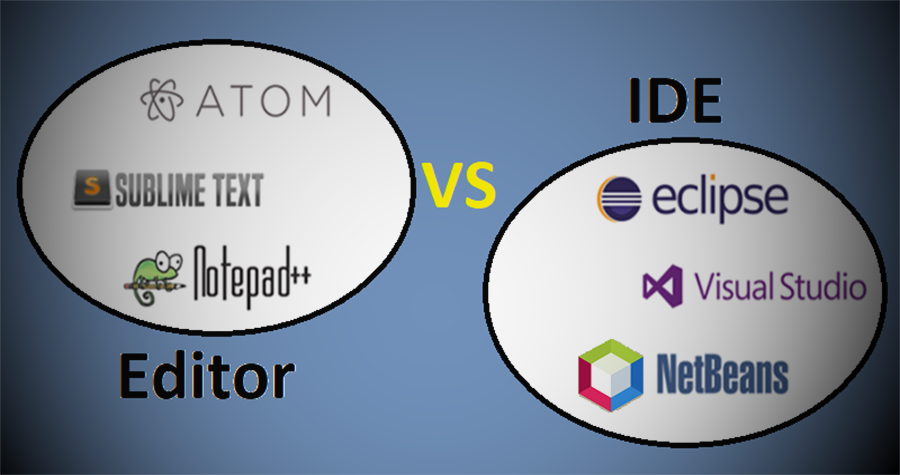
Visual Studio Code with PHP extensions and PhpStorm are both practical editors. An IDE can save time with navigation, debugging, and refactoring; a well-configured code editor can be sufficient too. See our guide to editors and IDEs for the broader comparison.
Hello, World—and why strict types matter
Create a file named hello.php, copy the following lines, and execute it from your terminal:
<?php
declare(strict_types=1);

$name = 'Universo Digital';
echo "Hello, {$name}\n";
php hello.phpYou’ll see Hello, Universo Digital followed by a newline. The strict_types declaration affects certain scalar type coercions at the call site. It does not force all of your variables to have fixed compile-time types, but it is a good reminder that PHP lets you choose explicit contracts when you need them.
Development environments, Composer, containers, and debugging
The initial PHP installation is straightforward; collaborating with other developers and deploying the same application repeatedly is where environment management becomes important. Don’t install a dozen services just because you can. Choose a toolset you can understand, reproduce, and debug.
| Tool | What it does | A sensible use case |
|---|---|---|
| PHP CLI + Composer | Run code, manage packages, and execute developer tools. | First exercises, libraries, and command-line jobs. |
| Laravel Herd | Convenient local PHP development environment. | Quick local Laravel and PHP setup where supported. |
| DDEV | Container-based, reproducible local development environments. | Teams and CMS applications that need several services. |
| Docker + Compose | Package and coordinate applications, databases, and caches. | Reproducible multi-service projects. |
| XAMPP | Bundled local web-development components. | Learning and local experiments, not a production architecture. |
| Laravel Sail | Laravel-oriented commands on top of Docker Compose. | Containerized local Laravel projects. |
| Symfony CLI | Project creation and local tooling for Symfony. | Symfony development and local server management. |
Check the interpreter and extensions you actually have
php -v
php --ini
php -m
php -i
composer --version
composer diagnose
php --ini shows the configuration loaded by your command-line interpreter, which might differ from the configuration loaded by PHP-FPM. Common extensions include pdo_mysql, pdo_pgsql, mbstring, intl, curl, openssl, sodium, zip, and opcache. Install the ones your application requires rather than treating every module as mandatory.
Packages and native extensions aren’t the same thing
Composer installs PHP packages into your project, typically under vendor/. Native extensions affect the PHP runtime and can require compatible binaries and additional system dependencies. PECL and PIE, the PHP Installer for Extensions, are references for the extension ecosystem. Always follow the extension’s specific compatibility requirements. Download Composer from the official site and verify its installer rather than pasting arbitrary commands from blogs into a server shell.
Debugging without guessing
var_dump() is useful when you’re learning, but step-through debugging is much more effective for tracing problems across controllers, services, and database access. Xdebug can integrate with development tools to set breakpoints and inspect program state. Follow the official installation guide. Don’t enable a public debugging endpoint in production, where it can expose information and add overhead.
PHP fundamentals: types, functions, classes, and data
PHP variables start with a dollar sign. Common types include int, float, string, bool, array, object, and null. PHP arrays are ordered maps that can behave as lists or dictionaries. They are exceptionally convenient, but large arrays have overhead: for millions of values, it may be worth considering specialized structures.
You will use if, match, switch, for, foreach, and while to control program flow. Here’s a simple typed function that validates its inputs before returning a purchase total:
<?php
declare(strict_types=1);

function orderTotal(float $unitPrice, int $quantity): float
{
    if ($unitPrice < 0 || $quantity < 0) {
        throw new InvalidArgumentException('Invalid order values');
    }

    return $unitPrice * $quantity;
}

echo orderTotal(12.50, 3); // 37.5
Multiplication isn’t the interesting part. The function documents its contract, rejects invalid data, and gives other programmers a clearer idea of what they can expect. As applications grow, this discipline helps catch errors before they become incorrect database records or invoices.
Enums and readonly classes
Objects let you group data and behavior. An enum is a much better way to model a limited set of order states than scattering magic strings throughout the code. A readonly class prevents its declared properties from being reassigned after initialization, although an object referenced by a property is not necessarily deeply immutable.
<?php
declare(strict_types=1);

enum OrderStatus: string
{
    case Pending = 'pending';
    case Paid = 'paid';
}

readonly class Order
{
    public function __construct(
        public int $id,
        public OrderStatus $status,
        public float $total,
    ) {}
}

$order = new Order(1, OrderStatus::Paid, 49.90);
echo $order->status->value; // paid
Later you will encounter interfaces, traits, namespaces, and dependency injection. Don’t begin by memorizing every design pattern. Learn functions, arrays, objects, error handling, and basic data modeling first; the reasons for larger application architecture will be much easier to appreciate.
Moving beyond syntax: forms, sessions, and request validation
Real web applications receive data, validate forms, check permissions, and report failures. PHP has supported these workflows for years, and it helps to understand them directly before a framework abstracts the details away.
Untrusted input and PHP superglobals
PHP provides special arrays such as $_GET for URL parameters, $_POST for submitted form data, $_SERVER for request information, and $_FILES for uploaded files. Anything received from a client is untrusted. A field you expect to contain a string might be absent, unusually long, or submitted as an array. Browser-side validation is convenient for users, but a secure server must validate again.
A complete example: a form with a CSRF token
Create form.php in a directory used only for local development. The following exercise combines form handling, sessions, validation, CSRF protection, and safe HTML output. The token demonstrates an important control, but this is not a complete production authentication system.
<?php
declare(strict_types=1);

session_start();
$_SESSION['csrf'] ??= bin2hex(random_bytes(32));

$message = '';
if ($_SERVER['REQUEST_METHOD'] === 'POST') {
    $token = $_POST['csrf'] ?? '';
    if (!is_string($token) || !hash_equals($_SESSION['csrf'], $token)) {
        http_response_code(403);
        $message = 'The form session is not valid.';
    } else {
        $name = $_POST['name'] ?? '';
        if (!is_string($name) || trim($name) === '') {
            $message = 'Please enter a valid name.';
        } else {
            $message = 'Hello, ' . trim($name);
        }
    }
}
?>
<!doctype html>
<html lang="en">
<head><meta charset="utf-8"><title>My first PHP form</title></head>
<body>
<form method="post">
    <label for="name">Your name</label>
    <input id="name" name="name" required maxlength="80">
    <input type="hidden" name="csrf"
      value="<?= htmlspecialchars($_SESSION['csrf'], ENT_QUOTES, 'UTF-8') ?>">
    <button type="submit">Send</button>
</form>
<p><?= htmlspecialchars($message, ENT_QUOTES | ENT_SUBSTITUTE, 'UTF-8') ?></p>
</body>
</html>
For a local demonstration, run php -S 127.0.0.1:8000 in that directory and open http://127.0.0.1:8000/form.php. Enter a name, submit, and observe how the response changes. The message is HTML-escaped, so angle brackets in the submitted name are not treated as markup. Read the OWASP CSRF Prevention Cheat Sheet to understand what the token does and doesn’t protect.
For production, configure session-cookie flags appropriately—Secure, HttpOnly, and SameSite—and implement authentication, authorization, timeouts, and sensible request limits. A CSRF token is not a substitute for checking whether the user is allowed to change a resource.
Where should application data live?
Normal PHP variables belong to the current execution context, not to durable storage. Persistent business information belongs in a database or another designed storage system. Short-lived shared data might belong in a cache or session store; slow work may need a queue. In a horizontally scaled deployment, sessions must be accessible to the relevant application instances, or you need a carefully managed affinity strategy.
Errors versus exceptions
An invalid input is an expected outcome that deserves a helpful response. An unexpected database failure is different: it should be logged, monitored, and turned into a controlled HTTP response that does not reveal passwords, file paths, or internal SQL. PHP’s exception system and the PSR-3 logger interface help organize those responsibilities.
A project structure that can grow
Even without a framework, separate the public HTTP entry point from application code. A basic layout might be:
my-application/
├── public/
│   └── index.php         ← HTTP entry point
├── src/                   ← application logic and classes
├── tests/                 ← automated tests
├── config/                ← nonsecret configuration
├── vendor/                ← Composer-installed dependencies
├── composer.json
├── composer.lock
└── .env                   ← local values; do not commit secrets
Your web server should expose only the intended public directory, not your dependency tree or configuration files. Keep secrets out of Git, include a harmless .env.example if useful, and use an appropriate secret manager for production.
Composer, Packagist, and the PHP-FIG standards
In early PHP projects, developers often downloaded libraries manually and copied files from one directory to another. Composer largely replaced that workflow. It resolves dependencies, installs libraries, manages autoloading, and provides consistent project tooling. Packagist is the main public PHP package repository used by Composer; the repository and the package manager are two different things.
Managing dependencies without surprises
A new project might initialize Composer, add a logging package, validate its metadata, and audit its dependencies with the following commands:
composer init
composer require monolog/monolog
composer validate
composer audit
composer install --no-dev --prefer-dist --optimize-autoloader
The last command is a common production-oriented install pattern; don’t paste all the commands into an empty directory and assume you’ve built a production application. Applications should normally commit both composer.json and composer.lock so deployments resolve the same package versions. vendor/ is usually installed during a controlled build or deployment instead of being committed as source.
PSR-4 autoloading
Autoloading means you don’t have to scatter manual require calls across your classes. Composer can map namespaces to directories using PSR-4. Here is a deliberately small composer.json example:
{
  "name": "universodigital/php-demo",
  "require": {
    "php": "^8.5"
  },
  "autoload": {
    "psr-4": {
      "UniversoDigital\\App\\": "src/"
    }
  }
}
The class UniversoDigital\App\Product would then live in src/Product.php. After changing autoload mappings, run composer dump-autoload. Frameworks automate much of this setup, but the underlying idea is worth understanding.
PSR standards: why interoperability matters
The PHP Framework Interop Group publishes shared recommendations: PSR-4 for autoloading; PSR-3 for logging; PSR-7 for HTTP messages; PSR-15 for middleware; and PSR-12 for coding style. Common interfaces make libraries easier to combine and replace.
But standards don’t eliminate framework lock-in. An application built around Laravel-specific APIs will still take work to port to Symfony. PSRs reduce unnecessary coupling; they don’t make architecture choices disappear. That’s one reason to keep core business logic distinct from framework plumbing where practical.
How PHP runs in production: PHP-FPM, OPcache, and JIT
A very common deployment looks like Nginx or Apache → PHP-FPM → application → database/cache. PHP-FPM maintains a pool of worker processes and receives requests through FastCGI. For a large share of business applications, publishing sites, and APIs, this is still a predictable and easy-to-operate foundation.
PHP-FPM and the request lifecycle
With the conventional PHP-FPM model, the application handles a request with a largely fresh application-level state. Workers themselves may be reused; OPcache, extensions, and certain internal resources can persist, but you should not treat an ordinary variable as a safe place to store information between requests. This request-level reset reduces some classes of accidental state leakage and simplifies application reasoning.
OPcache: usually more important than JIT
OPcache holds compiled PHP bytecode in memory so the engine doesn’t have to repeatedly compile the same source files. It is a central performance tool for typical production PHP. The configuration manual explains its memory and invalidation controls. PHP’s JIT can help particular compute-heavy workloads, but it rarely fixes a slow website dominated by database queries, external APIs, and I/O.
Worker counts and real memory budgets
Setting pm.max_children too high can exhaust RAM and trigger swapping or process termination. Setting it too low can queue requests unnecessarily. Measure actual worker memory use, account for the database and other services, then load-test. More workers are not always better.
For most teams, the most effective first optimizations are sensible database indexes, removal of N+1 queries, OPcache, caching based on measured demand, and avoiding repeated network calls. Don’t replace your runtime because of a benchmark that tests an empty response.
Modern PHP runtimes: FrankenPHP, RoadRunner, Swoole, and async libraries

It’s no longer accurate to say that every PHP application must start from scratch on every request. We need to distinguish the PHP engine, its execution interfaces, the application server, and the lifecycle of application state. Some combinations provide isolation between requests; others keep application objects resident in memory. Different workloads benefit from different trade-offs.
| Runtime or library | How it works | What to watch |
|---|---|---|
| PHP-FPM | FastCGI worker pool; mostly request-scoped application state. | Worker sizing, memory, timeouts, scaling. |
| FrankenPHP | PHP application server built on Caddy; classic and persistent-worker modes. | State reuse, app compatibility, worker lifecycle. |
| RoadRunner | Go-based application server coordinating long-running PHP workers. | Recycling workers, resource leaks, stale state. |
| Swoole / OpenSwoole | Extensions providing servers, asynchronous I/O, and coroutine facilities. | Extension compatibility, blocking code, concurrency semantics. |
| ReactPHP / Amp | Asynchronous libraries and event-driven ecosystems. | Not universal drop-in replacements for PHP-FPM. |
FrankenPHP and its two execution styles
FrankenPHP embeds PHP into a web server based on Caddy. It can run conventional PHP applications or keep compatible applications loaded in worker mode. The infrastructure integrates modern HTTP capabilities, TLS management, and deployment options. The official documentation and worker guide explain both configurations.
RoadRunner’s Go-managed workers
RoadRunner uses a Go application server to coordinate PHP worker processes. Reusing workers can avoid repeated framework bootstrapping and improve throughput or tail latency on specific loads. That benefit is not guaranteed by simply installing RoadRunner: database work, application initialization, memory growth, and other services all influence the result.
Swoole, OpenSwoole, and coroutines
These extensions add asynchronous server and networking facilities to PHP. They are useful when you need large numbers of concurrent connections or specialized event-driven systems. But installing an extension does not automatically make every library coroutine-aware or every blocking call nonblocking. The runtime model, supported extensions, and compatibility of your application have to be tested deliberately.
Async libraries, WebSockets, and queues
ReactPHP and Amp make asynchronous programming available through libraries. For real-time features, Laravel Reverb provides a WebSocket server, while Symfony Messenger supports message-driven processing. You do not have to rewrite a whole application into a persistent service just to add notifications, background jobs, or a live dashboard.
Laravel Octane and Symfony Runtime
Laravel Octane integrates supported high-performance servers such as FrankenPHP, RoadRunner, and Swoole with Laravel applications. Symfony Runtime separates application bootstrapping from a specific runtime through adapters. Exact capabilities depend on the server and installed integration; they aren’t all interchangeable.
The critical risk: state that survives a request
Persistent workers can keep singletons, static properties, caches, database connections, and other objects alive. If a service accidentally stores one user’s data in shared application state, another request might see stale or sensitive information. Memory leaks can accumulate as well. A robust design must reset request-specific state, safely handle connections, limit worker lifetimes, monitor memory, and test isolation explicitly. The Octane documentation covers related pitfalls.
My preferred starting point is well-tuned PHP-FPM and OPcache. Consider persistent workers when measurements show meaningful savings from avoiding startup work or when the architecture specifically requires that execution model. An inefficient SQL query stays inefficient under Octane, RoadRunner, or FrankenPHP.
Performance testing that means something
A real benchmark should include authentication, realistic database access, serialization, caching, error behavior, and concurrency. Measure p50/p95/p99 latency, sustained throughput, worker memory, timeouts, CPU saturation, and recovery after failure. A service that is fast until one worker stalls or runs out of memory is not operationally optimized. Design for graceful restarts, observability, and backpressure instead of optimizing a single requests-per-second number.
Hands-on: build a small JSON API in plain PHP
Let’s create something closer to a real web endpoint without relying on a framework yet. The goal is to see how PHP reads an HTTP method, validates a query parameter, and returns JSON with meaningful status codes. Create a directory named public and place this file at public/index.php:
<?php
// File: public/index.php
declare(strict_types=1);

header('Content-Type: application/json; charset=utf-8');

if ($_SERVER['REQUEST_METHOD'] !== 'GET') {
    header('Allow: GET');
    http_response_code(405);
    echo json_encode(['error' => 'Method not allowed']);
    exit;
}

$id = filter_input(INPUT_GET, 'id', FILTER_VALIDATE_INT);
if ($id === false || $id === null || $id < 1) {
    http_response_code(400);
    echo json_encode(['error' => 'Supply a positive integer id']);
    exit;
}

echo json_encode([
    'id' => $id,
    'name' => 'Sample product',
    'price' => 25.50,
], JSON_THROW_ON_ERROR);
Start PHP’s built-in local development server, then query the endpoint from another terminal:
php -v
php -S 127.0.0.1:8000 -t public
# In another terminal:
curl -i "http://127.0.0.1:8000/?id=1"
You should receive a JSON object with a product ID, name, and price. Omit the ID or supply a noninteger value and the endpoint returns HTTP 400. Try POST instead of GET and you get 405. None of this makes a production-ready service yet: it lacks authentication, persistence, rate limiting, logging, tests, and careful operational configuration.
Do not expose php -S as a public production server. The official manual explicitly describes the integrated server as a development tool. Use an appropriate application server or web server when deploying publicly.
Accessing a database with PDO
PHP Data Objects (PDO) provides a consistent interface across multiple database drivers. The following MySQL example assumes you’ve created a matching table, set the environment variables, and already validated the $email input:
<?php
declare(strict_types=1);

$pdo = new PDO(
    'mysql:host=127.0.0.1;dbname=shop;charset=utf8mb4',
    getenv('DB_USER') ?: '',
    getenv('DB_PASSWORD') ?: '',
    [PDO::ATTR_ERRMODE => PDO::ERRMODE_EXCEPTION]
);

$statement = $pdo->prepare(
    'SELECT id, name FROM users WHERE email = :email'
);
$statement->execute(['email' => $email]);
$user = $statement->fetch(PDO::FETCH_ASSOC);
Prepared statements keep user-supplied values separate from SQL structure, helping prevent SQL injection. They cannot parameterize arbitrary table or column identifiers. Use allowlists for dynamic identifiers, and learn about transactions, indexes, schema migrations, and connection limits before developing a production data layer.
From a demo API to a maintainable service
Once you have multiple routes, authentication, validation, authorization, middleware, storage, and tests, a framework often reduces duplication. The principle is simple: build enough code yourself to understand the responsibilities, then use a mature framework to avoid reinventing the same plumbing in every project.
PHP frameworks: Laravel, Symfony, Slim, and CMS platforms
Frameworks exist to give applications structure and solve repetitive problems. A CMS is something different: it is an application or platform built to manage content, often extended with plugins. A runtime or web server is different again. Knowing these layers prevents the common mistake of comparing WordPress, Laravel, and FrankenPHP as if they solved the same problem.
Laravel offers an integrated developer experience with routing, Eloquent, validation, migrations, queues, and authentication tools. Symfony provides a full framework and independently reusable components valued in long-lived systems. Slim is a lighter HTTP framework for services that need fewer built-in conventions. WordPress is an enormously influential CMS built on PHP, not a generic replacement for every application framework.
If you’d like to see the language in a real deployment, our Spanish-language WordPress on Ubuntu 24.04 installation guide is a practical reference. It uses PHP 8.3 for that specific environment; that’s not a universal requirement for WordPress or a reason to disregard supported newer branches.
Laravel and Symfony in depth: the PHP framework leaders
If you’re serious about PHP web development, both Laravel and Symfony deserve attention. They’re not isolated worlds: Laravel uses Symfony components, both rely on Composer and common PHP conventions, and many third-party packages integrate with either ecosystem. They have different approaches to application structure, but both can support large, maintainable systems.
Laravel: moving from a prototype to a working product

Think of everything an online store, booking service, or SaaS product needs beyond a basic route: input validation, database access, authentication, authorization, email, background tasks, caching, tests, and deployment scripts. Laravel gives you an integrated set of tools and conventions, allowing a team to focus sooner on what the application actually does.
At its core you’ll encounter Eloquent ORM and database migrations, Artisan for CLI tasks, validation, queues, and caching. Eloquent makes common data operations convenient, but an ORM does not excuse N+1 queries or a badly designed schema. Learn the SQL underlying your models.
Start a Laravel application
The official installation guide covers PHP requirements, Composer, and optional frontend tooling. After preparing the prerequisites, the following creates a new application. Do not run these inside an existing production site.
composer global require laravel/installer
laravel new shop-demo
cd shop-demo
npm install && npm run build
composer run dev
Now imagine you want a route returning JSON. Add a small route in the Laravel application’s routes/web.php:
<?php
// routes/web.php
use Illuminate\Support\Facades\Route;

Route::get('/hello/{name}', function (string $name) {
    return response()->json(['message' => "Hello, {$name}"]);
});
This is intentionally simple. A larger application should use controllers and services rather than placing complicated business logic in route definitions.
Laravel for the frontend: Blade, Livewire, and Inertia
Blade renders server-side templates. Livewire allows interactive interfaces built largely around PHP and pairs well with Alpine.js. If your team uses React, Vue, or Svelte, Inertia.js connects the frontend to Laravel without requiring a completely separate public API in every case. The official starter kits also help with initial authentication and application structure.
Important Laravel ecosystem tools
- Sanctum: API tokens and authentication for supported SPA scenarios.
- Horizon: monitoring Redis-backed Laravel queues.
- Telescope and Pulse: application debugging, activity, and performance visibility.
- Octane: application execution on supported persistent runtimes.
- Reverb: WebSocket and real-time features.
- Scout: search-engine integration.
- Pennant: feature flags.
- Sail: local Docker development.
- Forge, Laravel Cloud, and Vapor: distinct commercial deployment and infrastructure offerings.
Don’t install every item on that list. Learn routes, models, validation, views, migrations, and tests first. Introduce WebSockets, queue dashboards, or persistent workers once you’ve encountered an actual need for them.
Symfony: reusable components and explicit architecture

Symfony can function as a complete framework or as a family of independent components. Its organization around services, dependency injection, HTTP handling, and configuration makes it a good environment for learning how a larger application fits together. That component model also explains why other PHP products can use Symfony libraries without being Symfony applications.
For a guided start, use Symfony Fast Track or the official documentation. Install Symfony CLI, then create a new sample project:
symfony new portal-demo --webapp
cd portal-demo
symfony server:start
The --webapp flag selects commonly used full-stack packages; a small API can start from a lighter skeleton. Check the PHP requirements of your selected Symfony branch. Here’s a basic controller that returns the same greeting as the Laravel example:
<?php
// src/Controller/HelloController.php
namespace App\Controller;

use Symfony\Component\HttpFoundation\JsonResponse;
use Symfony\Component\Routing\Attribute\Route;

final class HelloController
{
    #[Route('/hello/{name}', name: 'hello', methods: ['GET'])]
    public function hello(string $name): JsonResponse
    {
        return new JsonResponse(['message' => "Hello, {$name}"]);
    }
}
A real application should move nontrivial logic into services. Symfony’s dependency injection container helps organize those dependencies; Twig handles common server-rendered views, and Doctrine offers persistence and ORM integrations.
The Symfony Profiler and developer feedback
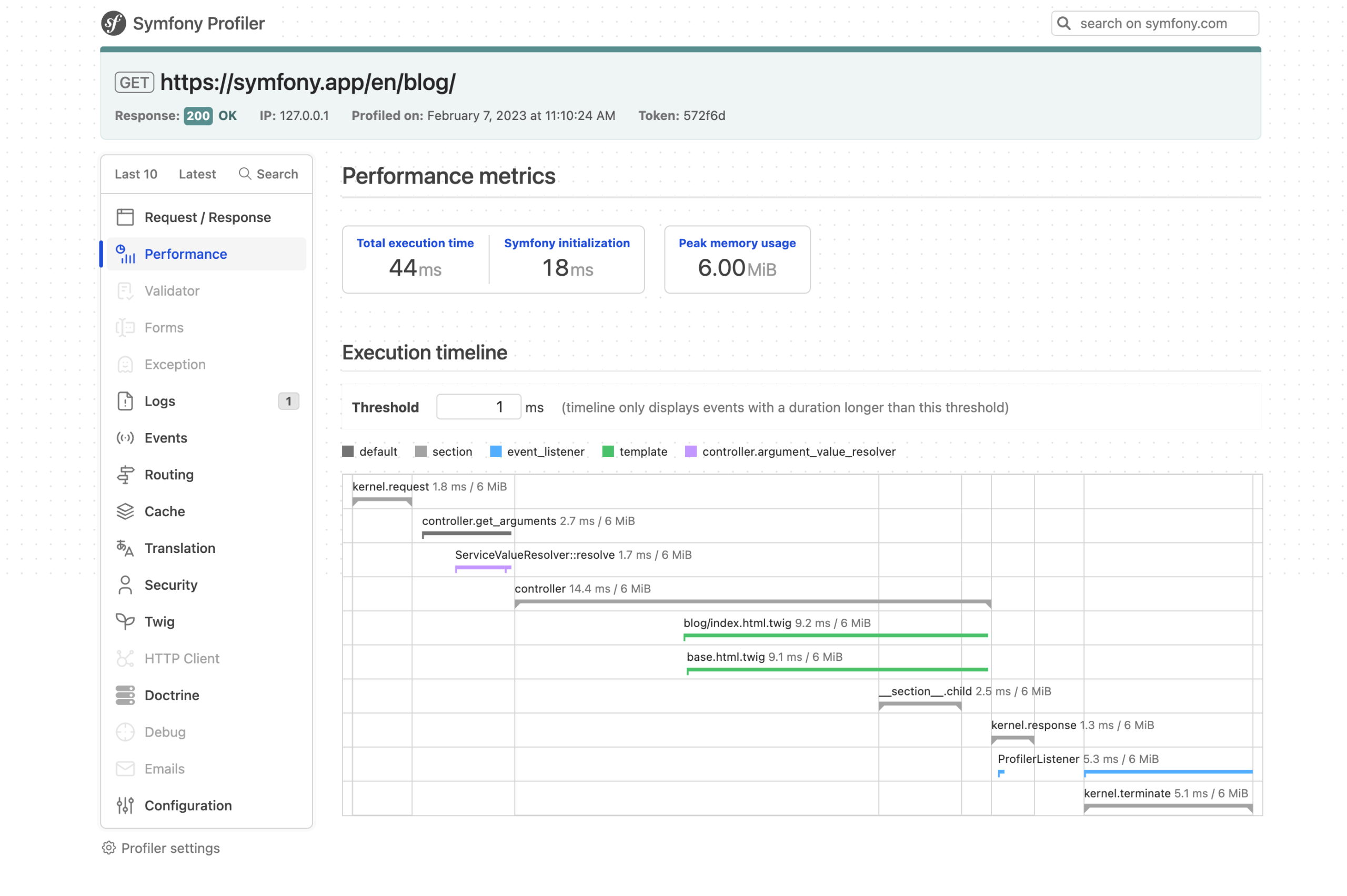
Symfony Profiler lets you inspect requests, queries, memory, and execution time. Having visibility into those details is a major advantage when you’re learning why an application is slow or why a service behaves differently than expected.
The Symfony components you’ll encounter
- HttpFoundation, Routing, and HttpKernel: request and response infrastructure.
- Security and Validator: authentication, authorization, and validation.
- Messenger: messages and asynchronous work; Workflow: application states and transitions.
- Cache, HttpClient, and Serializer: caching, outbound HTTP, and data transformation.
- Console, Runtime, Symfony UX, and API Platform: CLI, execution adapters, UI integration, and API development.
Laravel or Symfony? The decision in practice
| What you’re optimizing for | Laravel | Symfony |
|---|---|---|
| A complete application workflow | Integrated conventions and starter tooling. | A complete framework with explicit service and component configuration. |
| Data access | Eloquent ORM and migrations. | Commonly Doctrine; other choices are possible. |
| Frontend | Blade, Livewire, or Inertia. | Twig, Symfony UX, or a separate JavaScript frontend. |
| Queues and persistent runtimes | Queues, Horizon, Octane, Reverb. | Messenger, Runtime, supported adapters. |
| Modularity | Broad Laravel package ecosystem. | Independent components reusable across projects. |
| Scaling a real system | Requires good design, testing, and operations. | Requires good design, testing, and operations. |
Don’t try to master both simultaneously when you’re starting out. Build a full application with one, then revisit the other. Laravel often makes it easier to experience the complete product workflow quickly. Symfony is particularly instructive if you’re interested in how services, HTTP components, and dependencies fit together. Neither framework can compensate for poor requirements, a broken data model, or missing tests.
Other PHP frameworks and platforms
PHP also offers Slim, CodeIgniter, Yii, CakePHP, Laminas, Phalcon, and API Platform. Check maintenance status, supported PHP versions, and ecosystem fit before committing to one.
Related products include WordPress, Drupal, Joomla, Magento Open Source, and Nextcloud. Their existence demonstrates PHP’s range, but these are applications or platforms with their own purposes, not substitutes for a general-purpose framework.
The PHP ecosystem map: databases, libraries, and developer tools
One of PHP’s enduring strengths is that there are mature tools for most everyday backend problems. That doesn’t mean every package is trustworthy. Before adopting a dependency, check its maintainers, release cadence, supported PHP versions, security history, and whether its design actually fits the problem.
Databases, ORM, and caching
PHP works with MySQL, MariaDB, PostgreSQL, SQLite, and other databases. PDO is a standard database-access interface; Doctrine DBAL provides database abstraction; Doctrine ORM maps objects to persisted data; and Eloquent serves the Laravel ecosystem. Each abstraction has benefits and trade-offs. No ORM removes the need to understand joins, indexes, transactions, and query plans.
Redis is commonly used for caching, temporary shared state, and queue-related infrastructure; Memcached is another caching option. Neither should be added to every project simply because large services use them. Measure whether caching is necessary and define how entries expire or are invalidated.
HTTP clients, messaging, logging, and frontend integration
Guzzle and Symfony HttpClient handle outbound HTTP requests. Monolog implements logging patterns compatible with PSR-3. Symfony Messenger and Laravel Queues support asynchronous jobs; some systems use an external broker such as RabbitMQ.
On the frontend, Vite helps bundle assets, Tailwind CSS provides utility-based styling, and frameworks such as React, Vue, or Svelte can communicate with PHP APIs. A modern PHP application does not have to use plain server-side templates exclusively.
Testing, static analysis, formatting, and profiling
| Tool | Primary role | Official documentation |
|---|---|---|
| PHPUnit | Automated unit and integration tests. | PHPUnit |
| Pest | Expressive testing workflows. | Pest |
| PHPStan | Progressive static analysis, including legacy projects. | PHPStan |
| Psalm | Static verification of types and contracts. | Psalm |
| PHP-CS-Fixer | Automated code formatting. | PHP-CS-Fixer |
| PHP_CodeSniffer | Coding-standard checks. | PHP_CodeSniffer |
| Xdebug | Step-through debugging and diagnostics. | Xdebug |
| Blackfire | Application profiling and performance diagnostics. | Blackfire |
| Rector | Automated refactoring and upgrade assistance. | Rector |
For a first serious project, focus on Git, Composer, a debugger, a test framework, and one static analyzer. Add specialized tools when you understand what problem they solve. Git, GitHub Actions, and GitLab CI/CD make reproducible development and automated checks easier.
Native PHP extensions
Native extensions expose facilities such as database drivers, cryptography, internationalization, network protocols, compression, and image processing. Common examples include cURL, Intl, mbstring, and Sodium. Remember that a Composer package and an engine extension are different kinds of dependencies, with different installation and compatibility requirements.
Security, testing, and maintainable PHP applications
PHP has its share of famous security incidents, but those incidents should be analyzed by vulnerability class, application design, and maintenance practices. Concatenating user input into SQL is unsafe in PHP, JavaScript, Python, or Java. Similarly, a poorly designed authorization check is a vulnerability regardless of the language used.
Essential security practices
- SQL injection: use prepared statements, safe ORM patterns, and allowlists for dynamic identifiers.
- Cross-site scripting: encode output for the actual context—HTML, HTML attributes, JavaScript, and URLs require different treatment.
- Cross-site request forgery: protect state-changing operations with appropriate tokens and request controls.
- Password storage: use
password_hash()andpassword_verify(), not homemade password hashes. - Session security: configure cookies, expiry, and session-ID regeneration after login.
- Uploads and files: restrict size and type, validate content, store files safely, and avoid executable upload directories.
- Authorization: check permissions server-side for every resource, not just whether a user is logged in.
- Dependencies: track supported versions and audit advisories before deployments.
The following demonstrates two separate operations. In an actual application, the password variables must come from a properly designed registration/login flow:
<?php
declare(strict_types=1);

$name = $_GET['name'] ?? '';
if (!is_string($name)) {
    $name = '';
}
echo htmlspecialchars($name, ENT_QUOTES | ENT_SUBSTITUTE, 'UTF-8');

$hash = password_hash($password, PASSWORD_DEFAULT);
$matches = password_verify($submittedPassword, $hash);
htmlspecialchars() protects a text value used in an HTML context; it is not a universal escape function for JavaScript, CSS, or SQL. For stronger guidance, use the OWASP Cheat Sheet Series and the OWASP Top 10.
Automated tests and static analysis
A useful suite checks units, real database interactions, HTTP behavior, and critical authorization paths. PHPUnit and Pest make testing practical; PHPStan and Psalm catch many likely type and contract problems before runtime. You can introduce static-analysis levels gradually in older code rather than pretending the entire project can be fixed in one pass.
composer require --dev phpunit/phpunit phpstan/phpstan
vendor/bin/phpunit
vendor/bin/phpstan analyse src --level=5
composer audit
Installing PHPUnit does not automatically produce a test suite; those commands assume you have configured a project and created tests. A 100% coverage number is not meaningful if the tests don’t exercise the behavior that matters. Prefer reliable regression tests for critical operations over coverage for its own sake.
Observability, upgrades, and incident recovery
Production failures need structured logs, request IDs, error rates, slow queries, memory metrics, and response-time distributions. Turn off public error display, keep details in protected logs, and ensure that monitoring doesn’t capture secrets. Plan database migrations, rollback procedures, and backup restoration as part of your application lifecycle.
; Illustrative php.ini settings, not a complete configuration
display_errors = Off
log_errors = On
opcache.enable = 1
; Size memory and PHP-FPM pools for the actual workload
Upgrading PHP deserves a staging environment. A CMS core may support a new branch while an abandoned plugin or binary extension does not. Read the official migration appendices, update dependencies, run tests, review deprecation warnings, and then deploy deliberately.
PHP versus Node.js, TypeScript, Python, Java, C#, Go, Ruby, and Rust
There isn’t an objective best backend language independent of the project. Team experience, available libraries, performance requirements, operational skill, maintenance horizons, and product constraints pull decisions in different directions. The following comparison describes typical strengths and trade-offs, not a benchmark ranking.
| Technology | Where it often excels | What to evaluate |
|---|---|---|
| PHP (Laravel, Symfony) | CMS, e-commerce, business applications, CRUD-heavy APIs, accessible hosting. | Legacy quality, CPU-intensive workloads, worker state under persistent runtimes. |
| JavaScript/TypeScript (Node.js) | Shared frontend/backend language, I/O services, real-time workflows, npm. | Event-loop blocking, dependency management, runtime type safety. |
| Python (Django, FastAPI) | AI/data integration, readable automation, web backends. | CPU profile, process/concurrency model, packaging and deployment. |
| Java/Kotlin (Spring) | Enterprise systems, JVM tooling, established teams, complex domains. | Runtime footprint, setup, operational and architecture complexity. |
| C# (ASP.NET Core) | Enterprise services, mature developer tooling, the .NET ecosystem. | Team skills, hosting integration, long-term platform choices. |
| Go | Network services, infrastructure, concurrency, simple distribution. | Fewer out-of-the-box CMS workflows; domain-specific productivity. |
| Ruby (Rails) | Convention-driven product development and rapid web prototyping. | Talent availability, project performance profile, ecosystem fit. |
| Rust | Memory safety, resource-sensitive services, specialized high-performance systems. | Learning curve and higher initial complexity for ordinary web apps. |
PHP versus Node.js and TypeScript
Node.js is attractive when the same team writes TypeScript across the frontend and backend, or when the product uses substantial event-driven I/O and persistent connections. PHP offers a very mature path for HTTP requests, forms, database-backed business features, and conventional deployment. Both can scale; neither guarantees a good result with poorly designed SQL or unbounded workloads.
PHP versus Python
Python has a major advantage when your application directly depends on machine-learning libraries, scientific computing, or data-analysis workflows. Django and FastAPI are capable web tools in their own right. PHP remains a strong fit when the primary problem is content, commerce, administration, or business APIs. Picking a language because it sounds more fashionable is a weak substitute for understanding the project’s dependencies.
PHP versus Java, Kotlin, and C#
JVM and .NET platforms offer mature enterprise tooling, sophisticated concurrency options, and excellent support for large teams. PHP may offer a more direct route for some conventional websites, but rewriting a successful Java or .NET service solely to simplify the language would usually be a poor use of resources. The same warning applies in reverse.
PHP versus Go, Ruby, and Rust
Go and Rust are often appealing for infrastructure and specialized services; Ruby on Rails offers another highly productive web ecosystem. In some systems it makes sense to keep the main product in PHP and implement a truly specialized component in another language. However, every new language introduces deployments, monitoring, dependencies, and integration costs. Justify that complexity with measured benefits.
What does performance actually mean?
A trivial hello-world benchmark is not a stand-in for an application that authenticates users, reads from a database, serializes data, and calls external services. Compare the same workload on equivalent hardware with realistic data, TLS, logging, and error behavior. Look at p95/p99 latency, sustained throughput, memory, CPU utilization, recovery, and total operating cost. Otherwise, you may attribute to a programming language what really came from the database, framework, or test setup.
Official learning material for the alternatives
| Stack | Primary documentation |
|---|---|
| JavaScript / TypeScript | Node.js, TypeScript, Express, NestJS |
| Python | Python, Django, FastAPI |
| Java/Kotlin | Java, Kotlin, Spring Boot |
| C# / .NET | C#, ASP.NET Core |
| Go | Go official documentation |
| Ruby | Ruby, Rails |
| Rust | Rust, Actix Web, Axum |
When should you choose PHP—and when shouldn’t you?
If I were building a content website, an online store, a back-office system, or a conventional business API today, PHP would be on my shortlist, especially with a team that understands Laravel, Symfony, or WordPress. Well-established tools, inexpensive hosting choices, and a mature body of operational knowledge are real advantages. But those advantages don’t override a project’s technical requirements.
I’d consider Python when machine-learning and scientific libraries are central; TypeScript when sharing the language across the product genuinely lowers complexity; and Go or Rust for particular infrastructure or resource-constrained services. A specialized service written in another language can coexist with a PHP application. You don’t need to turn every component into a separate microservice just to claim that you use a modern stack.
A new project is different from a rewrite
Choosing a language for a product you’re about to build is one decision. Rewriting a PHP application that has served customers for years is quite another. Before replacing a stable system, measure its actual problems, check whether upgrading PHP and its dependencies would address them, and calculate the risk of recreating well-tested features. Rewriting to follow a trend is often much more expensive than it first appears.
A decision framework that survives the next trend
Start with product requirements, your team’s expertise, available libraries and integrations, deployment constraints, expected load, security needs, and maintenance capacity. If significant uncertainty remains, build a small proof of concept and measure it under representative conditions. That process will usually tell you more than a long argument about which language is fashionable.
A practical learning roadmap: from PHP beginner to web developer
The best way to learn a language is to build something that starts simple and gradually becomes useful. Read the official documentation when you need it, but don’t spend weeks memorizing every feature before writing code. Here is a path that introduces complexity in a logical order.
Stage 1: learn the Web and basic PHP
Understand HTML forms, the client/server distinction, HTTP methods, status codes, and JSON. Practice PHP variables, operators, arrays, functions, loops, and file handling. Build a profile page that renders HTML and a CLI script that reads a CSV file. The MDN web development curriculum and the official PHP tutorial are strong starting points.
Stage 2: forms, sessions, and persistent data
Create a small product catalog. Begin with an in-memory array; then introduce SQLite and PDO. Implement create, read, update, and delete operations. Add server-side validation, prepared statements, sessions, authentication, and resource-level authorization. Every feature you add should teach you why application state and user input need careful handling.
Stage 3: organize the project with Composer and objects
Move business logic out of the public entry point. Use namespaces, PSR-4, service classes, and focused data-access components. Add tests with PHPUnit or Pest and run PHPStan. You don’t need a full hexagonal architecture for a beginner CRUD exercise; separating concerns and writing testable functions is already a major improvement.
Stage 4: rebuild it with Laravel or Symfony
Pick one framework and implement the catalog again using controllers, migration files, validation, an ORM or database abstraction, and HTTP tests. Add users, permissions, pagination, and searching. Laravel Learn and Symfony Fast Track offer guided material. Compare the framework’s abstractions with what you built yourself—now you’ll understand what you’re gaining.
Stage 5: ship to a safe test environment
Use Git, automate a test run, prepare configuration without committing secrets, and deploy to a disposable test VPS or container. Configure HTTPS, backups, logs, and a rollback procedure. Your first production-style deployment should not be an experiment on a machine holding important customer data.
Stage 6: measure, optimize, and scale
Once the application works, collect latency and memory metrics. Identify slow SQL, inspect cache behavior, and move heavy jobs to a queue if necessary. Only then evaluate Octane, FrankenPHP, or RoadRunner. You’ll be learning to solve measured problems, not simply accumulating fashionable technologies.
A capstone project worth finishing
Build a small store with a catalog, stock levels, users, and orders. Start with CRUD operations and a JSON API. Then add admin/customer roles, stock checks, reporting, authentication, tests, and a documented deployment process. You don’t need real payment processing to learn the core architecture. A modest application with a working README, reproducible migrations, and automated tests teaches more than ten unfinished tutorials.
From your laptop to production: deployment, monitoring, and maintenance
Knowing PHP syntax and operating a production PHP application are related but different skills. Once people depend on your software, you need to think about certificates, database recovery, deployment safety, resource limits, logging, and incident response. PHP benefits from mature, well-understood procedures in all these areas.
A sensible reference architecture
A good starting point for a conventional application is Nginx or Apache, PHP-FPM with OPcache, a database, and verified backups. Add Redis, a job worker, or external file storage when they solve a specific problem. Each new service introduces dependencies, alerts, upgrades, and recovery work, so simplicity has operational value.
Official resources: Nginx, Apache HTTP Server, Caddy, PHP-FPM, OPcache, and the official PHP container images.
Before exposing your application to the Internet
- Serve only the intended
public/directory; don’t expose environment files or Composer dependencies. - Enable HTTPS and appropriate session cookies, security headers, and request-size limits.
- Use least-privilege accounts and permissions for the application, filesystem, and database.
- Keep credentials outside source control and out of error responses and logs.
- Install reproducible dependencies, track supported PHP versions, and run
composer audit. - Plan database migrations, verified backups, and a way to roll back a failed deployment.
- Collect application errors, response-time metrics, and PHP-FPM or persistent-worker health.
- Automate essential tests and practice recovery from failures.
Performance begins with measurements
When users report a slow page, the reason may be PHP itself, database indexes, external API calls, insufficient PHP-FPM workers, locking, a badly configured cache, or simply too much frontend JavaScript. Reproduce the problem, measure each part, and optimize the bottleneck you actually observe.
Blackfire is one option for profiling PHP application behavior. For HTTP load testing, k6 provides a documented approach to generating controlled test traffic. Use a test environment you own or have permission to exercise. Record your hardware, data volume, concurrency, logging, TLS, and methodology when discussing results.
Monitoring, tracing, and maintenance
OpenTelemetry provides standards for instrumenting systems, while Prometheus and Grafana are popular for metrics and dashboards. You don’t need a huge observability stack for a small site, but you should know how to answer questions such as “Why did this endpoint slow down?” and “Which dependency failed?” without guessing.
Finally, agree on who updates PHP and native extensions, how schema changes are deployed, what happens during a worker crash, and how data is restored. An application isn’t finished merely because it works on the developer’s machine.
Frequently asked questions
Is PHP dead in 2026?
No. It remains widespread across identifiable server-side websites, receives new language releases, and has a substantial package and framework ecosystem. That does not mean its share is growing in every market or that it dominates all categories of new projects.
Should I deploy PHP 8.5 immediately?
It depends on support requirements, extensions, framework compatibility, and the site’s existing code. Use a supported PHP branch, follow its latest maintenance release, and test upgrades before deployment. A new feature is not worth an avoidable outage.
Do I need Laravel to create a PHP API?
No. The plain PHP example earlier proves that you can build HTTP endpoints directly. Laravel, Symfony, or Slim add structure and reusable tools as complexity increases.
Can PHP handle persistent services and high-concurrency workloads?
Yes. FrankenPHP, RoadRunner, Swoole, and integrations such as Laravel Octane support different execution models. The critical caveat is managing long-lived state, resource lifetimes, and real workload performance rather than assuming a speed-up.
Can a PHP backend work with React or Python?
Absolutely. Your frontend can use JavaScript or TypeScript while PHP provides HTML and APIs. Specialized services in Python, Go, or another language can communicate with PHP over HTTP, messaging, or background jobs when the additional architecture is justified.
Which framework should a beginner learn first?
Start with basic PHP so you understand requests, functions, data, and errors. Then build one complete application in Laravel or Symfony. Laravel’s integrated workflow is welcoming when your goal is to ship an application; Symfony is especially useful if you want to explore service containers and reusable framework components. Both are capable choices.
Conclusion: judge PHP by the platform it is today
PHP remains a practical and powerful tool for building web software. Its strongest argument is not that it can outperform every other language in every benchmark; it is the combination of a mature ecosystem, long-term web experience, developer productivity, and deployment options ranging from conventional PHP-FPM to modern persistent runtimes.
That does not make it the right answer for every product. But dismissing it because of the worst PHP 5 code you’ve seen misses years of language improvements and a considerable amount of present-day engineering. When you choose your next backend stack, compare the actual requirements, the team, the operational costs, and the evidence. PHP deserves to be part of that comparison.
Official references and further reading
- PHP Manual, PHP 8.5 release notes, and supported version policy.
- W3Techs server-side languages (dynamic statistics; accessed October 11, 2026).
- Packagist and its September 2026 ecosystem report.
- Composer documentation and PHP-FIG recommendations.
- Laravel documentation, Octane, Symfony documentation, and Symfony Runtime.
- FrankenPHP, RoadRunner, Swoole, and OpenSwoole.
- OWASP security guidance and MDN web development.
- Also on Universo Digital: Programming languages, types, and classifications, Editor or IDE?, and the Nextcloud deployment walkthrough.
Editorial note: W3Techs percentages and Packagist totals are time-stamped observations, not permanent constants or direct counts of developers. Follow the original links for updated measurements and methodology.
Continue learning: Explore our programming languages series.